New Views Added to the Housekeeping Dashboard
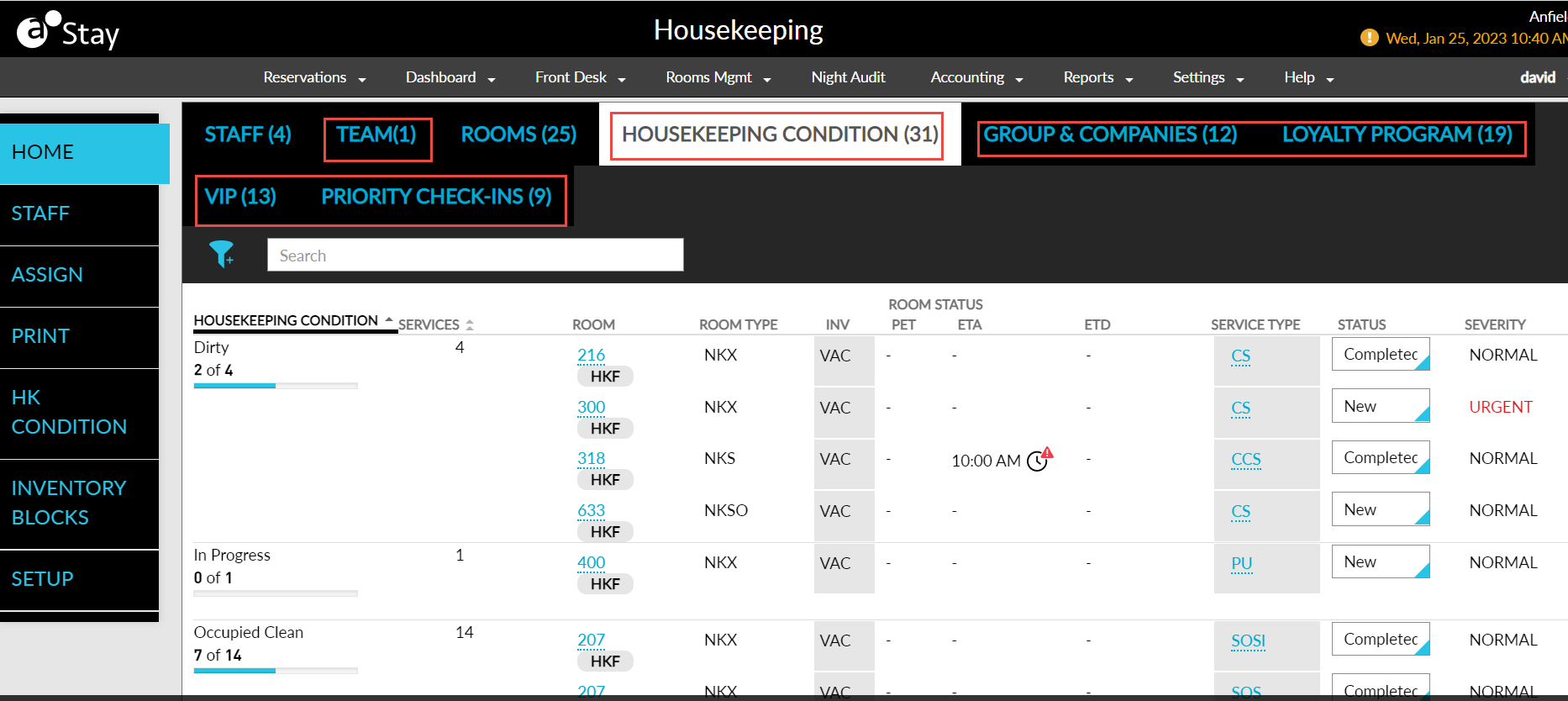
Stay is enhanced to provide additional views to the housekeeping dashboard. The current housekeeping dashboard displays a summary of progress made by a staff member (staff view), with details of the room assigned to them (rooms view). The following additional views are added to the housekeeping dashboard:
-
Priority Check-Ins
-
Housekeeping Condition
-
Group & Companies
-
Loyalty Program
-
VIP Status
Priority Check-Ins
This tab displays only the service requests assigned to priority check-in reservations, and not all the service requests. The service requests assigned to priority check-in reservations are grouped as follows:
-
Pre-Reg
-
All the service requests available for the rooms with the Pre-Reg option enabled in the reservation are displayed.
-
Only the service requests for the reservations that has the arrival date as the current property date are displayed.
-
-
Digital Check-Ins
-
All the service requests available for the rooms where the guests made a web check-in for the reservations are displayed.
-
Only the service requests for the reservations that has the arrival date as the current property date are displayed.
-
The following new columns are added to the Priority Check-Ins tab:
|
|
|---|---|
|
|
|
|
|
|
|
|
|
|
|
|
|
|
|
|
|
|
|
|
|
|
|
|
|
|
|
|
|
|
Additionally, users can filter records using the Housekeeping Features option. A progress indicator is added to both the Pre-Reg and Digital Check-Ins groups.
Housekeeping Condition
This tab displays all the assigned service requests in the property listed under the respective housekeeping condition of the rooms.
The following new columns are added to the Housekeeping Condition tab:
|
|
|---|---|
|
|
|
|
|
|
|
|
|
|
|
|
|
|
|
|
|
|
|
|
|
|
|
|
|
|
|
|
|
|
Additionally, users can filter records using the Housekeeping Features option.
Group & Companies
This tab displays all the service requests assigned to group reservations, or reservations that are associated with a company. All the groups and companies that have active reservations on the current property date are displayed, and the service requests raised for the rooms assigned to these reservations are listed under the respective group or company.
The following new columns are added to the Group & Companies tab:
|
|
|---|---|
|
|
|
|
|
|
|
|
|
|
|
|
|
|
|
|
|
|
|
|
|
|
|
|
|
|
|
|
|
|
|
|
Additionally, users can filter records using the Housekeeping Features option. A progress indicator is displayed for each group and company in the dashboard. The service requests of reservations that have groups and companies associated are considered under the group.
Loyalty Program
This tab displays the service requests assigned to reservations that are associated with a loyalty program.
The following new columns are added to the Loyalty Program tab:
|
|
|---|---|
|
|
|
|
|
|
|
|
|
|
|
|
|
|
|
|
|
|
|
|
|
|
|
|
|
|
|
|
|
|
|
|
Additionally, users can filter records using the Housekeeping Features option. A progress indicator is displayed for each loyalty program in the dashboard. The service requests of reservations that have both loyalty program and VIP status associated are displayed in both the tabs.
VIP Status
This tab displays all the service requests assigned to reservations that are associated with a VIP status.
The following new columns are added to the VIP Status tab:
|
|
|---|---|
|
|
|
|
|
|
|
|
|
|
|
|
|
|
|
|
|
|
|
|
|
|
|
|
|
|
|
|
|
|
|
|
Additionally, users can filter records using the Housekeeping Features option. A progress indicator is added below each VIP status name in the dashboard. The service requests of reservations that are eligible for priority check-ins, and have loyalty program, VIP status, group, and company associated are displayed in all the tabs.
Rooms
The following changes are made to the existing columns, and new columns are added to the Rooms tab for an improvised user experience:
|
|
|---|---|
|
|
|
|
|
|
|
|
|
|
|
|
|
|
|
|
|
|
|
|
|
|
|
|
|
|
|
|
|
|
|
|
|
|
|
|
Additionally, users can filter records using the Pre-Reg, Digital Check-In, and Housekeeping Features options. A progress indicator is added below the room number of each room.
New Indicators in Housekeeping Dashboard
The following new indicators are added to all views of the housekeeping dashboard:
-
Group Code: When service requests are created for the rooms assigned to group reservations, the group code is displayed next to the room number in all views of the housekeeping dashboard.
-
Housekeeping Features: The housekeeping features of the room are indicated by the HKF flag in the dashboard views, next to the room number. The features are displayed when users mouse over the HKF flag.
-
Shared Reservation: Reservations in share are indicated by the shared reservation icon next to the room number.
-
Pre-Reg: Reservations marked as Pre-Reg are indicated using the Pre-Reg icon next to the room number.
-
Digital Check-In: Digital check-in done for reservations are indicated using the digital check-in icon next to the room number.